Edit the description
How to open the details of a code and edit the description in LiquidoDocs Explorer.
Code description
Each code can have an associated description, useful for more easily identifying the linked document content.
The description can be edited from the code details page. The same area also lets you manage tags and families associated with the selected item.
Open the code details
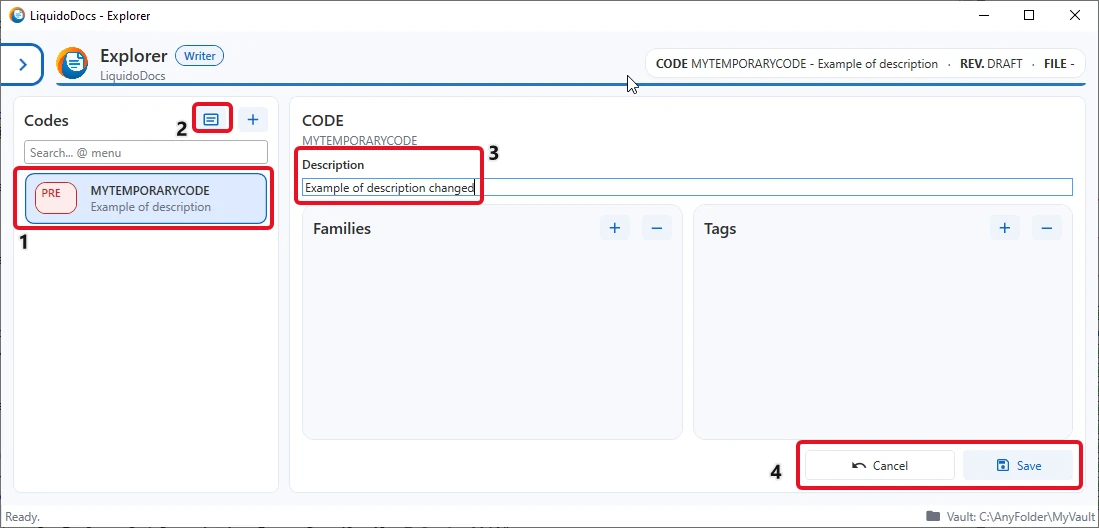
To edit the description, select a code from the list in the “Codes” section and press the details button, identified by the text card icon.
Edit and save the description
After opening the details, you can edit the description field of the selected code. The change remains pending until it is saved or canceled.
Unsaved changes
When the description, tags or families are changed, Explorer indicates that there are changes that have not yet been saved.
- When there are unsaved changes, Explorer shows the save button.
- You can cancel unsaved changes and return to the previous state.
- If you press the details button again or select another code while there are unsaved changes, Explorer asks whether you want to save them before continuing.
Tags and families on the same page
The same details page also lets you associate tags and families with the selected code. Full management of tags and families is described in a dedicated guide.
Other guides about codes
Consult the other documentation sections to create new codes, search for items and associate families and tags.