Create a new code
How to create a new code in LiquidoDocs Explorer and use it as a document container.
What a code is in LiquidoDocs
In LiquidoDocs, a code is a document item: it can represent a product, a component, a specific document or a general container for technical files.
For example, a company may choose to use a single code “0001” to collect drawings, manuals, certificates and reports related to the same item. Alternatively, it can create more specific codes, such as “DR-0001” for a drawing, “MNL-0001” for a manual and “CRT-0001” for a certificate.
Families and tags then help classify these items: for example, by indicating that “DR-0001” is a drawing, “MNL-0001” is a manual and “CRT-0001” is a certificate.
Before creating a code
Before creating a new code, Explorer must be configured correctly and a valid Writer license must be available.
- You must have already chosen a Vault location from the settings and restarted the application. Open the settings guide
- You must have a valid Writer license to use archive creation and editing features. Open the license guide
Open code creation
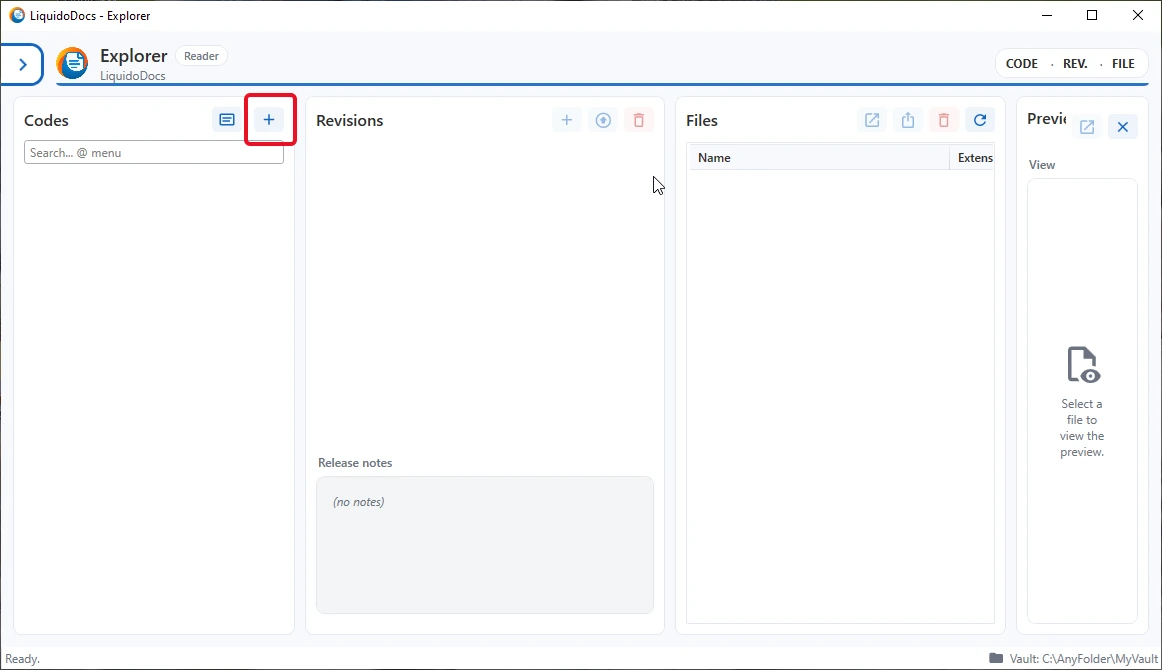
To create a new code, go to the “Codes” section and press the “+” button. This command opens the window for creating the new document item.
Enter code and description
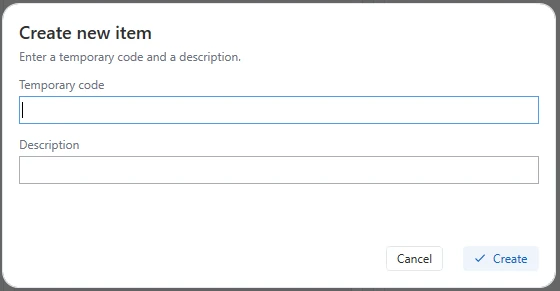
In the creation window, enter the temporary code and a description. The code identifies the document item, while the description helps quickly recognize the content or purpose of the created item.
Why the code is temporary
The code name is temporary until the content is promoted to revision A. During this initial phase it can still be changed, so you can correct the name before making the first document revision stable.
As long as the code remains in “pre” revision, it can also be deleted by deleting its “draft”. The terms “pre” and “draft” are kept in English in all interface languages.
Newly created code
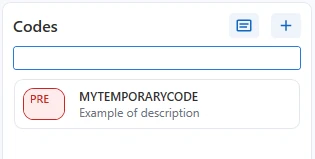
After creation, the new code appears in the code list. From here you can continue working on its draft, add files, assign a more precise description and prepare the first document revision.
Other guides about codes
Consult the other documentation sections to search for codes, edit descriptions and associate families and tags.