Request a demo license
How to request, download and activate a free demo license for LiquidoDocs Explorer Writer.
Free demo license
During the beta phase, you can request a free demo license to enable Writer functions.
Explorer always remains available in read mode. The demo license enables BaseArchive writing and lets you try the program fully on the current computer.
Open the License section
To request a demo license, open the main menu using the Bookmark button and go to the License section.
- Press the Bookmark button to open the main menu.
- Select the License item to open the local status and activation tools.
License status
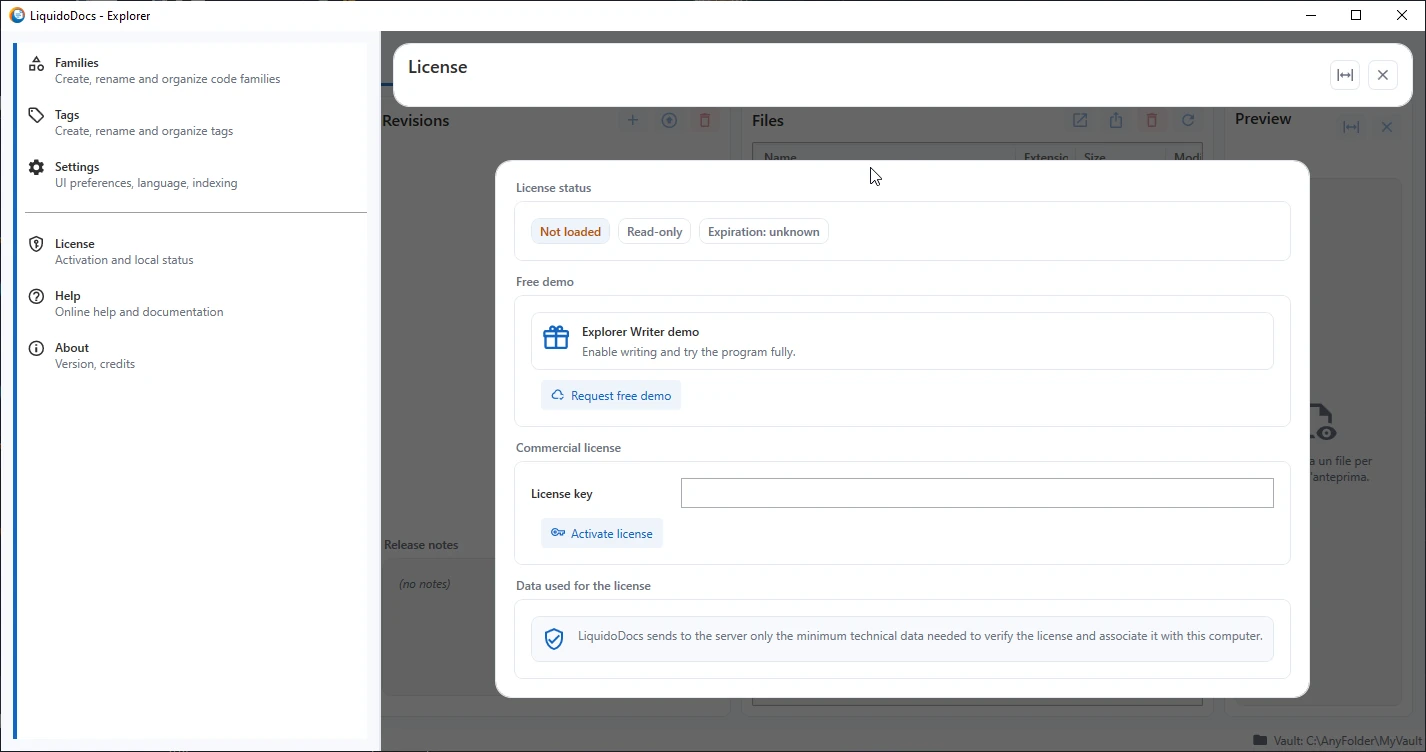
The License section shows the current license status, the reading mode and any expiration date. If no valid Writer license is loaded, Explorer remains in read-only mode.
Request the demo
In the “Free demo” section, press the “Request free demo” button to start the request.
- Press “Request free demo”.
- Explorer asks for confirmation before sending the request.
- If you confirm, Explorer requests the license from the server and downloads the demo license file.
- After the download, the license is saved and automatically activated on the current computer.
Request confirmation
Before requesting the demo license, Explorer shows a confirmation message. The request is sent only if you confirm the operation.
If you cancel, no request is sent and the license is not downloaded.
Commercial license
The commercial license section may be visible in the interface, but it is not active yet in this beta phase.
Data used for the license
LiquidoDocs sends to the server only the minimum technical data needed to verify the license and associate it with this computer. The data is not sent automatically, but only when you request or activate a license.
Reader and Writer
Without a Writer license, Explorer remains usable in Reader mode. With the demo license active, you can create and edit BaseArchive archives according to the functions available in the beta version.
Other license guides
Consult the other documentation sections to understand Reader and Writer modes and the functions available in the beta phase.